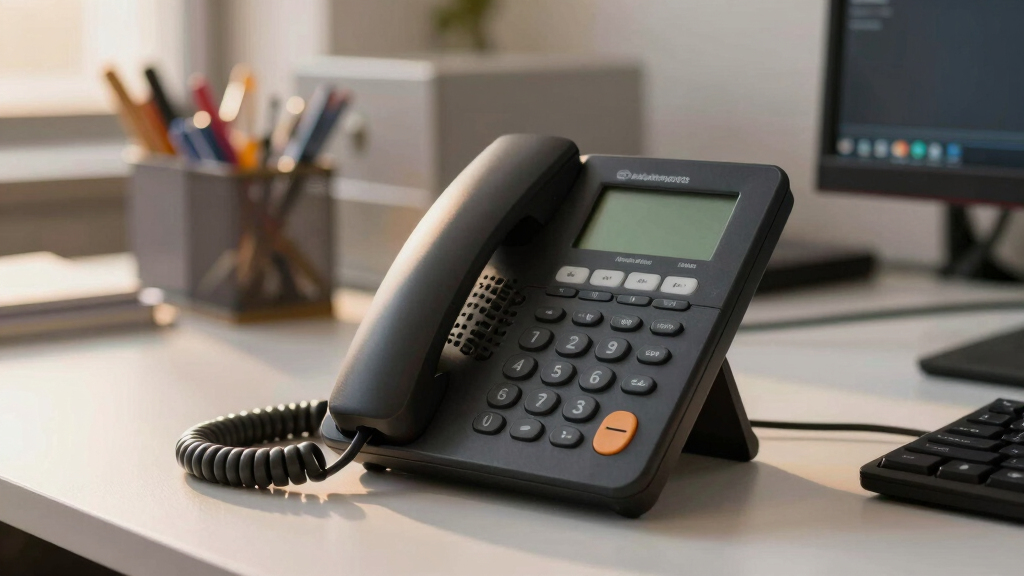

Choosing the best enterprise VoIP phone involves balancing features, ease of use, and scalability. The Yealink T54W stands out as the overall top pick for its robust feature set and user-friendly interface. The Polycom VVX 250 offers excellent value for mid-sized teams, while the Fanvil X7 impresses with its large touchscreen and multiple lines. Each option has tradeoffs, like cost versus advanced features or simplicity versus customization. Continue reading for a detailed breakdown to find the best fit for your organization.

Get business pricing on networking and server gear
- Business-only prices and quantity discounts
- Tax-exempt purchasing
- Multiple users, one account, clear invoices
Key Takeaways
- The top-ranked models balance advanced features with ease of setup, making them suitable for large enterprises and smaller teams alike.
- Display size and interface complexity are key differentiators, affecting user experience and training needs.
- Line capacity varies significantly; choosing a phone with enough SIP lines is critical for high-volume use cases.
- Build quality and connectivity options like Wi-Fi and Bluetooth are decisive for flexible office environments.
- Price often correlates with feature set; premium models include touchscreens and video capabilities, while budget options focus on core calling functions.
| Yealink T54W IP Phone, 16 VoIP Accounts, 4.3-Inch Color Display, Wi-Fi, Bluetooth, Dual Gigabit Ethernet |  | Best Overall for Versatile Business Use | VoIP Accounts: 16 | Display: 4.3-inch color | Connectivity: Wi-Fi, Bluetooth, Dual Gigabit Ethernet | VIEW LATEST PRICE | See Our Full Breakdown |
| Polycom VVX 250 Business Media Phone |  | Best Value for Clear Business Communication | Display: 2.8-inch color | HD Voice: Polycom HD Voice 2 | Ethernet Ports: 2 Gigabit | VIEW LATEST PRICE | See Our Full Breakdown |
| Fanvil X7 Enterprise VoIP Phone, 7-Inch Color Touch Screen, 20 SIP Lines |  | Best for Extensive Call Management with Touch Interface | Display: 7-inch capacitive touch | SIP Lines: 20 | Audio: HD with Opus | VIEW LATEST PRICE | See Our Full Breakdown |
| Fanvil X3U Enterprise VoIP Phone with 2.8-Inch Color Display and 6 SIP Lines |  | Best Compact Multi-line Phone for Professional Use | Display: 2.8-inch color | SIP Lines: 6 | Audio: HD with G.722 and Opus | VIEW LATEST PRICE | See Our Full Breakdown |
| Grandstream GXV3370 IP Video Phone with 16 Lines and 7-Inch Touch Screen |  | Best for Video-Enabled Enterprise Communication | Lines: 16 | Display: 7-inch color touch | Camera: Advanced megapixel HD | VIEW LATEST PRICE | See Our Full Breakdown |
| Poly VVX 450 Business IP Phone (Polycom) – 12-Line Color IP Desk Phone with Handset, PoE, 4.3″ LCD |  | Best Overall Enterprise VoIP Phone | Number of Lines: 12 | Display: 4.3-inch color LCD | Connectivity: PoE, USB, Ethernet | VIEW LATEST PRICE | See Our Full Breakdown |
| Fanvil X210 Enterprise VoIP Phone with 4.3-Inch Color Display and Dual 3.5-Inch Side Displays |  | Best for Multi-Function Navigation | Display: 4.3-inch color | Side Displays: Two 3.5-inch color screens | SIP Lines: 20 | VIEW LATEST PRICE | See Our Full Breakdown |
| Grandstream GRP2613 IP Phone with 6 Lines and 4 SIP Accounts |  | Best for Enterprise Multi-Line Management | Lines: 6 | SIP Accounts: 4 | Display: 2.8-inch color | VIEW LATEST PRICE | See Our Full Breakdown |
| Yealink T54W IP Phone |  | Best for Flexibility and Connectivity | Display: 4.3-inch, 480×272 pixels | Power Supply: 5V/2A included | Connectivity: PoE, Bluetooth 4.2, dual-band Wi-Fi | VIEW LATEST PRICE | See Our Full Breakdown |
More Details on Our Top Picks
Yealink T54W IP Phone, 16 VoIP Accounts, 4.3-Inch Color Display, Wi-Fi, Bluetooth, Dual Gigabit Ethernet
The Yealink T54W stands out as the most balanced choice for enterprises needing a flexible, feature-rich phone. Its support for up to 16 VoIP accounts and built-in Wi-Fi and Bluetooth make it ideal for dynamic office environments. Compared with the Grandstream GXV3370, the T54W offers a more straightforward setup but lacks the advanced video capabilities. While lacking a dedicated touchscreen, its ergonomic design and adjustable display suit users who prioritize comfort and simplicity. However, the absence of a power adapter included can be inconvenient, especially for new setups. This model makes the most sense for professionals who need reliable connectivity without the complexity of high-end video features.
Pros:- Supports up to 16 VoIP accounts for extensive call management
- Built-in Wi-Fi and Bluetooth for versatile wireless connectivity
- Adjustable display enhances ergonomic comfort
Cons:- Power adapter not included, adding extra cost
- Mid-range features may lack advanced telephony functionalities for power users
Best for: Managers and professionals requiring multi-account support with flexible connectivity options
Not ideal for: Businesses needing integrated video conferencing or advanced app development
- VoIP Accounts:16
- Display:4.3-inch color
- Connectivity:Wi-Fi, Bluetooth, Dual Gigabit Ethernet
- Power:PoE (Power over Ethernet), Power Adapter Not Included
Bottom line: This phone offers a reliable, flexible solution for busy professionals who need multi-line support and wireless options.
Polycom VVX 250 Business Media Phone
The Polycom VVX 250 excels as an affordable yet reliable choice for enterprise users prioritizing audio clarity. Its HD Voice 2 technology ensures crystal-clear calls, especially when compared to the Fanvil X3U’s HD but less advanced audio. The 2.8-inch color display offers straightforward navigation, though it falls behind larger screens like the Fanvil X7 for complex interfaces. Dual Gigabit Ethernet ports support seamless network performance, making it suitable for busy office environments. A USB port adds convenience for data transfer but doesn’t enhance telephony features. This device is ideal for organizations that want solid audio quality without the bells and whistles of video or multi-line support found in higher-end models.
Pros:- High-quality HD Voice 2 for clear calls
- Color display for easy navigation
- Dual Gigabit Ethernet ports improve network performance
Cons:- Limited to basic business use; not suitable for personal calls
- Small display size may hinder complex menu navigation
Best for: Small to medium-sized enterprises needing high-quality voice at an affordable price
Not ideal for: Organizations requiring extensive multi-line management or video conferencing
- Display:2.8-inch color
- HD Voice:Polycom HD Voice 2
- Ethernet Ports:2 Gigabit
- USB Port:Yes
Bottom line: This phone offers excellent audio clarity and usability for organizations prioritizing voice quality over advanced features.
Fanvil X7 Enterprise VoIP Phone, 7-Inch Color Touch Screen, 20 SIP Lines
The Fanvil X7 offers a premium experience with its large 7-inch capacitive touch screen and support for up to 20 SIP lines, making it perfect for high-volume call environments. Its extensive DSS keys and HD audio with Opus support surpass the Fanvil X3U’s capabilities, especially for users who need quick access to many lines. The built-in Bluetooth and Wi-Fi (via dongle) provide flexible connectivity options, although the need for additional accessories might be a minor inconvenience. Compared to the Yealink T54W, the X7’s focus on multi-line management and a bigger display makes it ideal for receptionists or call centers. However, the lack of a included power adapter and reliance on optional Wi-Fi dongles can complicate initial setup.
Pros:- Large 7-inch touch screen for easy navigation
- Supports up to 20 SIP lines for extensive call handling
- HD audio with Opus ensures clear communication
- Built-in Bluetooth and Wi-Fi for flexible device connection
Cons:- Power adapter not included, additional purchase required
- Wi-Fi connectivity requires a dongle, adding complexity
Best for: Receptionists or call center operators managing multiple lines and needing a visual interface
Not ideal for: Small offices with limited budget or users needing simple phones
- Display:7-inch capacitive touch
- SIP Lines:20
- Audio:HD with Opus
- Connectivity:Ethernet, Bluetooth, Wi-Fi (via dongle)
Bottom line: This phone is tailored for enterprises needing a high-capacity, user-friendly device for busy multi-line management.
Fanvil X3U Enterprise VoIP Phone with 2.8-Inch Color Display and 6 SIP Lines
The Fanvil X3U is a solid choice for enterprises seeking a compact yet capable phone. Its 2.8-inch color display provides clear visuals, and support for six SIP lines addresses multi-line needs in smaller workspaces. The device’s HD audio with G.722 and Opus codecs ensures sound quality, but it doesn’t match the extensive features of the X7 or Yealink T54W. Its dual-port Gigabit Ethernet offers smooth network operation, yet the absence of an included power adapter adds a minor hurdle for setups. Compared to the polycom VVX 250, the X3U’s smaller size makes it more suitable for individual desks rather than shared or reception areas. It fits well where space is limited but multi-line support remains necessary.
Pros:- High-definition color display for clear visuals
- Supports six SIP lines for multi-line handling
- HD audio with G.722 and Opus codecs ensures clear calls
Cons:- Power adapter not included, needs separate purchase
- Limited features compared to larger enterprise phones
Best for: Office professionals needing a multi-line device with a compact form factor
Not ideal for: High-volume call centers or users requiring large touchscreens
- Display:2.8-inch color
- SIP Lines:6
- Audio:HD with G.722 and Opus
- Ethernet:Dual-Port Gigabit
Bottom line: This model suits users who need a space-efficient device with multi-line support for daily professional calls.
Grandstream GXV3370 IP Video Phone with 16 Lines and 7-Inch Touch Screen
The Grandstream GXV3370 stands out with its integrated video conferencing capabilities and Android 7.0 OS, making it ideal for enterprises that want an all-in-one communication hub. Its 7-inch touch screen offers intuitive control, surpassing the Fanvil X7’s interface for video-centric tasks. Compared with the Yealink T54W, the GXV3370’s focus on video and app support makes it more suitable for executive or collaborative environments. Its support for 16 SIP lines and HD video calls offers a level of flexibility that traditional voice phones can’t match. The primary tradeoff is its complexity—setup may be more involved, especially for non-technical users, and it’s designed mainly for enterprise environments with integrated video needs.
Pros:- High-quality HD video conferencing with a megapixel camera
- Large 7-inch touch screen simplifies interaction
- Supports 16 SIP lines for versatile call handling
- Runs on Android 7.0 with SDK for custom app development
Cons:- Designed primarily for enterprise, not ideal for basic office use
- Setup can be complex for non-technical staff
Best for: Enterprises prioritizing integrated video conferencing and customizable app support
Not ideal for: Small offices or users seeking simple desk phones without video features
- Lines:16
- Display:7-inch color touch
- Camera:Advanced megapixel HD
- Operating System:Android 7.0
Bottom line: This device is best suited for enterprises seeking a combined video and voice communication platform with extensive customization options.
Poly VVX 450 Business IP Phone (Polycom) – 12-Line Color IP Desk Phone with Handset, PoE, 4.3″ LCD
The Poly VVX 450 stands out for its combination of high-quality audio and ease of use, making it a top pick for busy offices that need clear, reliable communication. Compared to the Grandstream GRP2613, it offers a larger display and more intuitive management features, though it requires PoE or an external power supply, which adds to setup complexity. Its support for 12 lines and HD voice ensures it can handle heavy call loads, but the extensive feature set may overwhelm users who need a straightforward device. The noise-eliminating technology enhances clarity in noisy environments, and the multiple connectivity options support diverse office setups. However, the requirement for PoE or power adapters and the potentially steep learning curve are tradeoffs for its professional-grade performance.
Pros:- High-quality HD voice and noise reduction technology
- Large, easy-to-read color display
- Supports up to 12 lines for multi-tasking
Cons:- Requires PoE or external power adapter for operation
- Some users may find the extensive feature set complex
Best for: Large enterprises or call centers needing reliable, high-capacity desk phones with advanced features
Not ideal for: Small offices or users seeking simple, plug-and-play phones without complex configuration
- Number of Lines:12
- Display:4.3-inch color LCD
- Connectivity:PoE, USB, Ethernet
- Power:PoE or external adapter
- Additional Features:HD voice, Noise reduction, Soft keys, Headset support
Bottom line: This phone is ideal for enterprises that prioritize call quality and multi-line management over simplicity.
Fanvil X210 Enterprise VoIP Phone with 4.3-Inch Color Display and Dual 3.5-Inch Side Displays
The Fanvil X210 is designed for professionals who need quick access to multiple lines and features, thanks to its main 4.3-inch color display and dual side displays. Unlike the Yealink T54W, which emphasizes connectivity options like Bluetooth and Wi-Fi, the X210 focuses on providing a comprehensive interface for managing up to 20 SIP lines through its side displays. It lacks included power adapters, which could be inconvenient, but its support for numerous lines makes it suitable for busy managers or receptionists. The limited description of additional features means users might need to experiment to unlock its full potential. This device offers a robust interface but may require some setup, making it less ideal for those who prefer plug-and-play simplicity.
Pros:- Large color display for easy navigation
- Supports up to 20 SIP lines
- Dual Ethernet ports for flexible network connections
Cons:- Power adapter not included
- Limited info on additional features
Best for: Office professionals managing multiple lines and needing quick access to various functions
Not ideal for: Small teams or those with minimal call volume who prefer straightforward phones without extra displays
- Display:4.3-inch color
- Side Displays:Two 3.5-inch color screens
- SIP Lines:20
- Ethernet:Dual-port Gigabit
- Power Adapter:Not included
Bottom line: This phone suits busy managers who need multiple lines and quick access to features, but it’s less suited for simple setups.
Grandstream GRP2613 IP Phone with 6 Lines and 4 SIP Accounts
The Grandstream GRP2613 offers a solid balance of enterprise features with a manageable footprint, supporting up to 6 lines and 4 SIP accounts. Its 2.8-inch color display provides sufficient clarity for busy environments, and the inclusion of PoE simplifies deployment. Compared with larger, more feature-rich models like the Fanvil X210, it may lack some of the advanced interface options but compensates with a more straightforward setup. The addition of Wi-Fi 6 and Bluetooth in the GRP2613W variant broadens connectivity options, making it a flexible choice for enterprises that want wireless integration. The limited battery support and some setup complexity could be drawbacks for smaller teams or less tech-savvy users.
Pros:- Supports multiple lines and SIP accounts
- High-quality HD audio with noise reduction
- Dual-band Wi-Fi 6 and Bluetooth (GRP2613W)
Cons:- No batteries included; powered via PoE or adapter
- Limited to office and enterprise environments
Best for: Enterprises seeking a reliable, multi-line phone with flexible connectivity options
Not ideal for: Small offices or users who need more than 6 lines or advanced touchscreen features
- Lines:6
- SIP Accounts:4
- Display:2.8-inch color
- Ethernet:Dual-port Gigabit with PoE
- Wi-Fi:Dual-band 2.4/5GHz (GRP2613W)
- Bluetooth:Yes (GRP2613W)
Bottom line: This device is best for enterprises that need reliable multi-line support with modern wireless options, but it’s overkill for small teams.
Yealink T54W IP Phone
The Yealink T54W offers a balanced mix of high-resolution display and versatile connectivity, making it a versatile choice for various enterprise settings. Its 4.3-inch color screen is sharp and clear, comparable to the Grandstream GRP2613, but with added features like built-in Bluetooth 4.2 and dual-band Wi-Fi. These extras allow users to connect wireless headsets and mobile devices seamlessly, enhancing mobility within the office. Unlike the Fanvil X210, which emphasizes line management, the T54W provides a more integrated wireless experience, though it lacks specific details about speakerphone quality. Its included power supply and support for PoE simplify deployment. This model is well-suited for users who value flexible connectivity and high display quality.
Pros:- High-resolution 4.3-inch color display
- Built-in Bluetooth 4.2 and dual-band Wi-Fi
- Includes power adapter and supports PoE
Cons:- No specific info on speakerphone quality
- Limited details on compatibility with other systems
Best for: Office workers who need flexible connection options with reliable display quality
Not ideal for: Teams requiring extensive line management or multiple side displays
- Display:4.3-inch, 480×272 pixels
- Power Supply:5V/2A included
- Connectivity:PoE, Bluetooth 4.2, dual-band Wi-Fi
- Features:Adjustable LCD, USB recording
Bottom line: This phone is suitable for users needing flexible wireless connectivity paired with a crisp display, but less ideal for those managing many lines or advanced features.
How We Picked
The products in this roundup were evaluated based on several criteria that matter most to enterprise buyers. Performance and reliability were prioritized, ensuring these phones can handle high call volumes without issues. Usability was also key; intuitive interfaces and straightforward setup save time and reduce training costs. Build quality and connectivity options like Wi-Fi, Bluetooth, and Power over Ethernet (PoE) were assessed for durability and flexibility. Additionally, we considered value, ensuring the picks offer a good balance of features relative to their price, and scalability for growing organizations. The ranking reflects a combination of these factors, with a preference for models that excel across multiple areas while offering good overall value.Factors to Consider When Choosing Best Enterprise Voip Phone
When selecting an enterprise VoIP phone, it’s important to look beyond just the specifications. Consider your organization’s size, call volume, and existing infrastructure. A phone with too few lines or limited connectivity may hinder growth, while overly complex models could overwhelm staff. Features like touchscreens, video calling, and integrated apps add convenience but come at a higher cost. Compatibility with your VoIP provider and future scalability should also influence your choice to avoid costly upgrades down the line.Line Capacity and Number of SIP Accounts
Determine how many concurrent calls your organization needs to support. Phones with more SIP lines and accounts are better suited for reception areas or call centers. Choosing a device with insufficient capacity can lead to call drops or the need to upgrade prematurely, which adds costs. On the other hand, overestimating your needs might result in paying for unused lines. Balance current demand with future growth to select a device that scales smoothly.
Display Size and User Interface
Large, high-resolution screens and intuitive interfaces improve user experience, especially for staff handling multiple calls or needing quick access to features. Touchscreens facilitate easier navigation and integration with other apps. However, more advanced interfaces come with higher prices and potentially longer training periods. Simpler models with basic displays can suffice for straightforward tasks but may limit functionality for power users.
Connectivity Options
Flexibility in connectivity enhances deployment options. Wi-Fi and Bluetooth capabilities allow for wireless setups, reducing clutter and cable management. PoE support simplifies installation by powering phones through Ethernet. Consider your office environment; if wired connections are limited, a Wi-Fi-enabled model becomes more attractive. Be cautious of devices that lack essential ports or wireless features if your workspace demands flexibility.
Build Quality and Durability
Enterprise phones endure frequent use, so robustness matters. Metal or high-quality plastic housings extend device lifespan, especially in busy environments. Cheaper models might look appealing initially but can break or malfunction sooner, leading to higher replacement costs. Also, check for features like anti-slip bases or impact-resistant screens if the phone will be in high-traffic areas.
Additional Features and Future Proofing
Features like video calling, integrated cameras, and touchscreen controls add value but increase costs. For organizations planning to leverage visual communication, these are worthwhile investments. For others, basic phones with clear audio and reliable calling functions might suffice. Future-proofing involves selecting models compatible with upcoming software updates and scalable for expansion, avoiding frequent replacements.
Cost and Total Value
While premium models offer advanced features, they come with higher price tags. Budget models may cover core needs but lack scalability or modern interfaces. Consider total cost of ownership, including maintenance and potential upgrades. Investing in a slightly pricier device with longer lifespan and better features often yields better long-term value, especially for critical communication needs.
Frequently Asked Questions
How do I know if a VoIP phone is compatible with my existing system?
Compatibility depends on whether the phone supports your VoIP provider’s protocols and network requirements. Most enterprise phones support SIP, which is widely used, but it’s important to verify specific features like firmware compatibility and network standards. Consulting your provider’s list of supported devices or working with a vendor during purchase can prevent costly mismatches and ensure smooth integration.
Should I prioritize a touchscreen interface or basic dial pad for my team?
Touchscreens offer quicker access to features and easier navigation, which benefits power users and teams managing multiple lines or complex workflows. However, they come at a higher cost and may require training. Basic dial pad models are simpler and more cost-effective, suitable for staff with straightforward calling needs. Consider your team’s skill level and usage patterns to choose the most effective interface.
Is PoE support necessary for enterprise VoIP phones?
Power over Ethernet (PoE) simplifies installation by providing power and network connectivity through a single cable, reducing clutter and the need for power adapters. It’s especially valuable in large deployments or environments where running power outlets is difficult. While not mandatory, PoE support typically improves setup flexibility and reduces ongoing maintenance costs.
How important is display size for an enterprise VoIP phone?
Display size influences ease of use and efficiency. Larger screens make it easier to read caller IDs, navigate menus, and access multiple lines or apps quickly. This can boost productivity, especially in high-volume environments. Small or basic displays are more affordable but may slow down workflows for busy staff who need quick, clear information at a glance.
Should I buy a video-enabled VoIP phone for my organization?
Video-enabled phones are beneficial if your team relies heavily on visual communication, remote collaboration, or video conferencing. They add convenience and versatility but also increase costs and complexity. For purely voice-based operations, a standard model might be more cost-effective. Consider your organization’s communication needs now and in the future to decide if the investment makes sense.
Conclusion
For organizations seeking the best overall performance, the Yealink T54W offers a balanced mix of features, user-friendliness, and scalability. The Polycom VVX 250 provides excellent value for mid-sized teams, while the Fanvil X7 stands out for its large touchscreen and multi-line capacity. Beginners or small offices might prefer simpler, less expensive models like the Fanvil X3U, while large enterprises with advanced needs should consider premium options with video and expanded features. Ultimately, your choice depends on your organization’s size, budget, and future growth plans.
Halloween Picks

11.2-Foot Halloween Inflatable Pumpkin with LED Lights

DomKom 6 ft Halloween Inflatable Ghosts Roasting Marshmallows

3 ft. Halloween Groundbreaker Skeleton for Outdoor Decoration
As an affiliate, we earn on qualifying purchases.