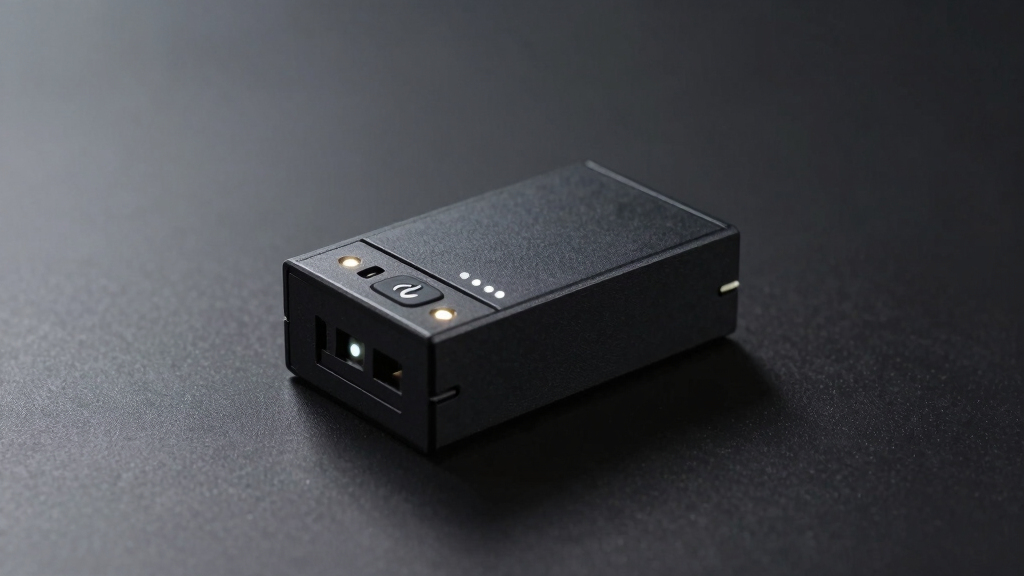
When selecting the best IP power switch for server reboot, reliability and remote management capabilities are key. The MSNSwitch Max stands out as the overall top pick for its robust surge protection and auto reboot features. For those prioritizing ease of use, the ezOutlet5 IP offers seamless WiFi control, while the Smart PDU provides professional-grade features for data centers. The main tradeoffs involve balancing complexity, cost, and feature set—more advanced options may come with higher costs and learning curves. Continue reading to see a detailed breakdown of the best choices for different needs and budgets.

Get business pricing on networking and server gear
- Business-only prices and quantity discounts
- Tax-exempt purchasing
- Multiple users, one account, clear invoices
Key Takeaways
- Top picks excel in auto reboot and remote management, critical for minimizing downtime.
- Ease of setup varies; WiFi-enabled switches simplify initial configuration for beginners.
- Higher-priced options often include advanced scheduling, ping support, or professional APIs.
- Build quality and surge protection are vital for protecting servers during power fluctuations.
- Choosing the right switch depends on balancing feature set with user experience and budget.
| MSNSwitch Max 2-Outlet Surge Protection & Power Metering Auto Reboot Switch |  | Best Overall for Simple, Reliable Reboot and Monitoring | Number of Outlets: 2 | Features: Surge protection, power metering, auto reboot, remote control, scheduling | VIEW LATEST PRICE | See Our Full Breakdown | |
| Dataprobe iBoot-G2 Basic Network Power Switch, 1 Outlet PDU, 110/220 VAC Operation |  | Best for Remote Reboot with Cloud and Web Access | Number of Outlets: 1 | Voltage: 110/220 VAC | Operation: Remote Power Control | VIEW LATEST PRICE | See Our Full Breakdown |
| Monoprice Blackbird Pro 4-Outlet Smart PDU – IP-Based Remote Power Management |  | Best for Advanced Network Control and Custom Power Sequences | Number of Outlets: 4 | Network Interfaces: TCP/IP, UDP, HTTP, HTTPS, SSL, SMTP, ARP, NTP, DNS, SNMP V1&V2&V3, Ping, Telnet, Modbus | Control: Remote and local control over individual outlets | VIEW LATEST PRICE | See Our Full Breakdown |
| iBoot-PoE Ethernet Power Switch – Remote Power Control for PoE Devices, Reboot Scheduling |  | Best for PoE Device Management and Flexible Deployment | Remote Power Management: Yes | PoE Extender Compatibility: Yes | PoE Injector Support: Yes | VIEW LATEST PRICE | See Our Full Breakdown |
| IP-Based PDU Remote Power Switch with Auto Ping Support |  | Best for Secure, Advanced Power Management in Data Centers | Number of Outlets: 2 | Power Capacity: 12 Amps | Mounting: 1U rack mount | VIEW LATEST PRICE | See Our Full Breakdown |
| netBooter NP-02B Remote Switched PDU with 2 Power Outlets, 120V/13A |  | Best for Managed Network Environments | Number of Outlets: 2 | Voltage: 120V | Current: 13A | VIEW LATEST PRICE | See Our Full Breakdown |
| ezOutlet5-2R Internet-Enabled IP & WiFi Remote Power Switch with Auto Reboot |  | Best for Network Reliability Automation | Outlet Type: NEMA 5-15R | Fuse: 10A ceramic fuse | Connectivity: Wi-Fi 2.4GHz, Ethernet | VIEW LATEST PRICE | See Our Full Breakdown |
| ezOutlet5 IP Enabled Remote Power with WiFi & LAN |  | Best for IoT Device Monitoring | Outlet Type: NEMA 5-15R | Fuse: 10A ceramic fuse | Connectivity: Wi-Fi 2.4GHz, Ethernet | VIEW LATEST PRICE | See Our Full Breakdown |
| ezOutlet5 – Internet Enabled IP & WiFi Remote Power Switch with Auto Reboot |  | Best for Consumer Network Device Automation | Connectivity: WiFi 2.4GHz, Ethernet | Features: Auto reboot, scheduled power cycles | Compatibility: Modems, routers, PCs | VIEW LATEST PRICE | See Our Full Breakdown |
| MSNSwitch2 Internet-Enabled IP Remote Power Switch with Auto Reboot and Scheduling |  | Best for Industrial and Critical Network Uptime | Connectivity: Internet-enabled | Features: Auto reboot, scheduled power cycling | Compatible Devices: Computers, modems, routers, DVRs | VIEW LATEST PRICE | See Our Full Breakdown |
| Smart PDU – IP Remote Reboot Power, 4 Switched NEMA 5-15R Outlets |  | Best for Enterprise-Level Management and Environmental Monitoring | Number of Outlets: 4 | Outlet Type: NEMA 5-15R | Connectivity: Gigabit LAN, Wi-Fi (optional) | VIEW LATEST PRICE | See Our Full Breakdown |
| MSNswitch2 IP Enabled Remote Power Switch with Auto Reboot and Dual Outlets |  | Best for Simple Remote Reboot with Cloud and App Control | Outlets: Dual | Fuse: 10A | Features: Ping Auto Reboot, Cloud & APP Control | VIEW LATEST PRICE | See Our Full Breakdown |
| Professional Software-Controlled 5-Outlet PDU Power Switch with USB and API Support, 1U Rack Mount |  | Best for Flexible, Software-Driven Control in Data Centers | Number of outlets: 5 | Outlet type: C13 | Maximum current per outlet: 15A | VIEW LATEST PRICE | See Our Full Breakdown |
More Details on Our Top Picks
MSNSwitch Max 2-Outlet Surge Protection & Power Metering Auto Reboot Switch
This device stands out for combining surge protection, power metering, and automatic reboot in a compact dual-outlet design, making it ideal for environments where space and cost matter. Compared with the IP-Based PDU, it offers easier setup and a straightforward interface, but its limited outlets restrict scalability. The real advantage is its automation—rebooting routers or modems automatically reduces downtime, especially during network issues, while remote control via app or web simplifies management. However, with only two outlets, it’s less suited for larger server racks. Its reliance on internet for remote features could be a downside in unstable networks.
Pros:- Automates rebooting to minimize downtime
- Remotely control and monitor devices via app or web
- Tracks real-time energy consumption
Cons:- Limited to two outlets, restricting expansion
- Requires internet connection for remote features
Best for: Small office setups or home labs needing automatic reboot and energy monitoring without complex network requirements
Not ideal for: Large data centers or environments requiring many outlets and advanced network protocols
- Number of Outlets:2
- Features:Surge protection, power metering, auto reboot, remote control, scheduling
Our verdict“This pick makes the most sense for users needing a simple, reliable auto-reboot device with monitoring capabilities in small-scale setups.”
Dataprobe iBoot-G2 Basic Network Power Switch, 1 Outlet PDU, 110/220 VAC Operation
The iBoot-G2 excels in remote management, offering web and cloud-based control over a single outlet, making it suitable for remote troubleshooting and quick reboots. Unlike the MSNSwitch Max, it provides cloud alerts and ease of setup, but its single outlet limits its use for multi-device environments. Its automatic reboot capability, combined with real-time alerts, reduces manual intervention and minimizes downtime. Still, users with larger racks or multiple devices will find its single outlet restrictive, and reliance on internet for remote access could be a concern in unstable networks.
Pros:- Remote management via web and cloud
- Automatic reboot with AutoPing
- Real-time alerts via email or SMS
Cons:- Limited to a single outlet, restricting scalability
- Requires internet for remote access, risking connectivity issues
Best for: Remote administrators managing a single critical device or small network needing easy web-based control
Not ideal for: Larger server setups requiring multiple controlled outlets or local control options
- Number of Outlets:1
- Voltage:110/220 VAC
- Operation:Remote Power Control
- Connectivity:Web browser, Cloud service
Our verdict“Ideal for remote management of a single device, especially if cloud alerts and automatic reboots are priorities.”
Monoprice Blackbird Pro 4-Outlet Smart PDU – IP-Based Remote Power Management
The Blackbird Pro offers four outlets with extensive network protocol support, making it suitable for sophisticated setups that require detailed control over each outlet. Compared with the iBoot-G2, it provides more outlets and supports custom power-up sequences, ideal for managing multiple devices. Its browser-based setup allows detailed configuration, but this complexity can be a hurdle for less experienced users. Security concerns also arise due to its network accessibility, and no physical control buttons limit local troubleshooting. This model suits environments with dedicated network management teams that can handle its advanced features.
Pros:- Remote power management over TCP/IP
- Supports custom power-up sequences and delays
- Browser-based setup for detailed control
- Supports multiple network protocols
Cons:- Complex setup requiring network knowledge
- Potential security vulnerabilities with network access
Best for: IT teams managing multiple servers or network devices needing detailed control over power sequences
Not ideal for: Small offices or users unfamiliar with network protocols and security considerations
- Number of Outlets:4
- Network Interfaces:TCP/IP, UDP, HTTP, HTTPS, SSL, SMTP, ARP, NTP, DNS, SNMP V1&V2&V3, Ping, Telnet, Modbus
- Control:Remote and local control over individual outlets
- Setup:Browser-based software interface
Our verdict“Designed for technical users who need granular control over multiple outlets with network protocol support in a secure environment.”
iBoot-PoE Ethernet Power Switch – Remote Power Control for PoE Devices, Reboot Scheduling
The iBoot-PoE excels in managing PoE-enabled devices, supporting reboot scheduling and real-time status monitoring. Its compatibility with PoE extenders and injectors makes it flexible for diverse network setups, unlike simpler switches that lack PoE-specific features. This device is especially useful for networks with PoE cameras or access points, where power and data are delivered over Ethernet. Its cloud management ensures remote control from anywhere, but it’s limited if your setup doesn’t involve PoE devices or if you need multiple outlets. Network dependency and limited power output details may also restrict its scope.
Pros:- Enables remote control and scheduling of PoE devices
- Supports PoE extenders and injectors for flexible deployment
- Provides real-time monitoring and alerts via cloud
Cons:- Requires network connection for remote management
- Limited info on maximum power output and port count
Best for: Network administrators deploying PoE cameras or access points requiring scheduled reboots and remote control
Not ideal for: Traditional data center environments with non-PoE equipment or multiple power outlets
- Remote Power Management:Yes
- PoE Extender Compatibility:Yes
- PoE Injector Support:Yes
- Cloud Service Access:Free
Our verdict“Best suited for PoE device environments where remote management and reboot scheduling are critical for uptime.”
IP-Based PDU Remote Power Switch with Auto Ping Support
The IP-Based PDU combines security, automation, and multiple features suitable for professional data environments. With two outlets and support for auto ping, Wake-On-LAN, and power sequencing, it provides detailed control and monitoring over critical devices. Unlike the MSNSwitch Max, which offers simple reboot capabilities, this unit emphasizes security with IP filtering and multi-user access, making it ideal for multi-tenant data centers. Its rack-mount design and circuit breaker protection add robustness, but the setup demands technical expertise, and the limited outlets may restrict larger deployments. No physical buttons mean management is entirely network-based.
Pros:- Remote and centralized power management via web or network
- Supports automation features like scheduling and auto ping
- Secure multi-user access with IP filtering and alerts
Cons:- Requires technical knowledge for setup and integration
- Limited to 2 outlets, not suitable for larger setups
Best for: Data center operators needing secure, automated power control for critical servers and network equipment
Not ideal for: Small offices or users unfamiliar with network security and advanced configuration
- Number of Outlets:2
- Power Capacity:12 Amps
- Mounting:1U rack mount
- Features:Auto ping, power sequencing, Wake-On-LAN, alerts
Our verdict“Designed for environments where security and automation for critical infrastructure are paramount, despite its limited outlet count.”
netBooter NP-02B Remote Switched PDU with 2 Power Outlets, 120V/13A
The netBooter NP-02B stands out for its comprehensive remote management capabilities through web, telnet, and USB interfaces, making it ideal for network administrators who need flexible control. Compared with other entries like the ezOutlet5-2R, it offers more advanced auto-reboot and system configuration features, but its limited two-outlet design may restrict use in larger setups. This model’s support for automation and self-timer functions ensures reliable server and network device reboots, especially in managed environments. However, the need for network or USB connections and its limited outlets mean it’s less suitable for equipment racks requiring multiple outlets or standalone operation without network access.
Pros:- Remote management via web, telnet, and USB interfaces
- Supports automation features like auto-reboot and self-timer
- Made in the USA and FCC/UL listed for reliability
Cons:- Limited to only 2 outlets, restricting scalability
- Requires network or USB connection for operation
Best for: IT professionals managing multiple servers or network equipment requiring detailed control and automation.
Not ideal for: Home users or small offices needing simple, plug-and-play solutions with multiple outlets.
- Number of Outlets:2
- Voltage:120V
- Current:13A
- Control Methods:Web, telnet, USB
- Management Features:AutoPing/Reboot, self-timer
- Made in:USA
Our verdict“This pick is best for network-savvy users who need precise, managed server reboot capabilities in a compact form.”
ezOutlet5-2R Internet-Enabled IP & WiFi Remote Power Switch with Auto Reboot
The ezOutlet5-2R makes a strong case for small network setups, thanks to its ability to automatically reboot connected devices based on internet connectivity issues. Unlike the netBooter NP-02B, it emphasizes WiFi and Ethernet connectivity for ease of use, making it suitable for users who prefer wireless or LAN-based control. Its scheduled power cycle feature helps maintain overall network health, but with only one outlet, it’s less suited to environments with multiple devices. The reliance on WiFi or Ethernet means it may be vulnerable in unstable network conditions, and absence of surge protection could be a concern for critical equipment.
Pros:- Automates rebooting of modems and routers to keep internet stable
- Supports scheduling for automatic power cycles
- Remote control via app on iOS and Android
Cons:- Limited to a single outlet, restricting use cases
- Dependent on WiFi or Ethernet connection for operation
Best for: Small office or home network users who want to maintain uptime without manual intervention.
Not ideal for: Large server rooms or users with multiple devices needing centralized power management.
- Outlet Type:NEMA 5-15R
- Fuse:10A ceramic fuse
- Connectivity:Wi-Fi 2.4GHz, Ethernet
- App Compatibility:iOS and Android
- Features:Auto Reboot, Scheduling, Remote Control
- Application:Network device watchdog
Our verdict“Ideal for small networks needing automatic reboot features to improve internet reliability, but not suited for multi-device environments.”
ezOutlet5 IP Enabled Remote Power with WiFi & LAN
The ezOutlet5 offers a straightforward solution for rebooting individual network devices, with its single outlet design making it suitable for targeted management. Compared with multi-outlet PDU options, it focuses on IoT and network device watchdog tasks, supporting remote control through cloud or API. This makes it appealing for users integrating the device into larger automation systems, but its single outlet limits broader server or equipment management. Its WiFi and LAN support allow easy integration, though lack of surge protection might be a downside for sensitive equipment. It’s better suited for small-scale or single-device applications rather than comprehensive server rack management.
Pros:- Supports remote reboot via app, cloud, and API
- Easy to integrate with iOS and Android devices
- Compatible with various network devices for automation
Cons:- Limited to a single outlet, restricting multiple device management
- No surge protection included
Best for: IoT device managers or network techs needing remote, automated reboots of critical network hardware.
Not ideal for: Data centers or server racks requiring multiple outlets and surge protection.
- Outlet Type:NEMA 5-15R
- Fuse:10A ceramic fuse
- Connectivity:Wi-Fi 2.4GHz, Ethernet
- App Compatibility:iOS and Android
- Application:Network device watchdog
- Control:Cloud and API remote control
Our verdict“Best for targeted device management where a single outlet and remote control suffice, but not for extensive server racks.”
ezOutlet5 – Internet Enabled IP & WiFi Remote Power Switch with Auto Reboot
The ezOutlet5 is a versatile and easy-to-use smart power switch designed for internet-connected devices like modems, routers, and PCs. Unlike the netBooter, it emphasizes auto-reboot based on connectivity loss, and supports scheduled power cycles for maintaining network uptime. Its LAN and WiFi connectivity options make setup straightforward, though it lacks physical controls, relying entirely on app and web interfaces. This makes it suitable for home or small office setups where automation and remote management count, but it may fall short in high-demand environments requiring multiple outlets or surge protection.
Pros:- Automates rebooting of internet devices to reduce downtime
- Supports scheduled power cycles and remote control
- Easy setup via LAN and WiFi
Cons:- Limited to LAN and WiFi connectivity, no physical controls
- No surge protection features
Best for: Home network users or small businesses seeking simple, automated internet device management.
Not ideal for: Large-scale server environments or users needing multiple outlets and advanced management features.
- Connectivity:WiFi 2.4GHz, Ethernet
- Features:Auto reboot, scheduled power cycles
- Compatibility:Modems, routers, PCs
- Control:App and web interface
- Outlet Type:NEMA 5-15R
- Auto Reboot:Supported
Our verdict“Ideal for basic network device auto-reboot needs in small or home settings, but not suited for complex server racks.”
MSNSwitch2 Internet-Enabled IP Remote Power Switch with Auto Reboot and Scheduling
The MSNSwitch2 excels in environments requiring robust remote control, auto-reboot, and scheduled power cycling for a variety of devices, including industrial computers and DVRs. Compared with the ezOutlet5 series, it supports more device types and offers integration via web, smartphone app, or API, making it versatile for complex setups. Its internet dependency for remote control means it’s less suitable where network stability is an issue, but its extensive control options and scheduled functions make it ideal for maintaining uptime in critical systems. The lack of physical controls and potential complexity for non-technical users are notable tradeoffs.
Pros:- Automates rebooting and scheduled power cycling for multiple devices
- Remote control via app, web, or API
- Supports a wide range of device types including industrial equipment
Cons:- Relies heavily on stable internet for remote features
- Potentially complex setup for non-technical users
- No physical control buttons
Best for: Industrial or enterprise users managing critical network infrastructure needing reliable remote control and automation.
Not ideal for: Casual or small-scale setups where simplicity and physical controls are preferred.
- Connectivity:Internet-enabled
- Features:Auto reboot, scheduled power cycling
- Compatible Devices:Computers, modems, routers, DVRs
- Control Methods:App, web, API
- Auto Reboot:Supported
- Power Load:Variable depending on device
Our verdict“Designed for critical network environments that require detailed automation and remote management with high reliability, but needs technical familiarity.”
Smart PDU – IP Remote Reboot Power, 4 Switched NEMA 5-15R Outlets
This enterprise-grade PDU excels in environments where remote control goes beyond simple rebooting. Its support for SNMP, HTTP(S), SSH, and environmental sensors makes it ideal for data centers demanding detailed device oversight. Compared to the Professional Software-Controlled 5-Outlet PDU, this model offers broader network protocols and environmental monitoring, but with a more complex setup that might intimidate less technical users. Its local and remote alert features reduce downtime by alerting staff immediately, though the initial configuration can be daunting and additional sensors or Wi-Fi modules increase overall cost. If managing multiple servers with environmental factors is your priority, this PDU offers comprehensive oversight.
Pros:- Supports multiple management protocols for flexible network integration
- Includes environmental sensors for temperature, humidity, smoke, and door status
- Offers local and remote alerts to minimize downtime
Cons:- Setup can be complex and require technical expertise
- Limited detail on power capacity and maximum current per outlet
Best for: IT professionals managing large server rooms needing detailed remote management and environmental monitoring
Not ideal for: Small office setups or home labs where simple rebooting is sufficient and complex setup is unnecessary
- Number of Outlets:4
- Outlet Type:NEMA 5-15R
- Connectivity:Gigabit LAN, Wi-Fi (optional)
- Protocols:SNMP v2/v3, HTTP(S), SSH, Telnet, SMTP
- Sensor Support:Temperature, Humidity, Smoke, Door
- Mounting Options:Rackmount, Surface mount
Our verdict“This PDU suits organizations requiring advanced remote management with environmental oversight, despite its setup complexity.”
MSNswitch2 IP Enabled Remote Power Switch with Auto Reboot and Dual Outlets
The MSNswitch2 offers straightforward remote reboot capabilities with the convenience of cloud and mobile app control, making it an appealing choice for smaller setups or less technical users. Unlike the Smart PDU, it doesn’t support environmental sensors or extensive network protocols, but its ease of use and scheduled power cycles make it ideal for quick server resets. It’s limited to a 10A fuse, which could be a concern for higher-power devices. Its reliance on a network connection for remote access means if your network is unreliable, remote control could be compromised. This pick makes the most sense for users prioritizing ease of use and automation over advanced management features.
Pros:- Easy control via cloud platform and mobile app
- Supports scheduled power on/off to automate reboots
- Dual outlets for managing two devices simultaneously
Cons:- Limited to 10A fuse capacity, restricting high-power devices
- Dependent on a stable network connection for remote access
Best for: Small IT setups or home server enthusiasts looking for simple, reliable remote power cycling via smartphone or cloud
Not ideal for: Large data centers or environments needing environmental monitoring or complex network management
- Outlets:Dual
- Fuse:10A
- Features:Ping Auto Reboot, Cloud & APP Control
Our verdict“This switch is perfect for users who want simple, app-based remote rebooting without the need for advanced network protocols.”
Professional Software-Controlled 5-Outlet PDU Power Switch with USB and API Support, 1U Rack Mount
Designed for environments where software integration is key, this 1U PDU provides reliable remote control over five C13 outlets through USB and API. It’s less suitable for quick, on-the-fly reboots compared to the MSNswitch2 because it requires a PC or server for control, but it excels in automated, programmable scenarios. Its support for APIs and remote desktop management makes it ideal for integration into larger systems, though its reliance on a PC and limited current capacity (15A per outlet) may restrict high-power applications. This model is best for users who need precise, programmable control over multiple devices without the need for network complexity.
Pros:- Supports API for custom automation and management
- Easy to control via PC software or remote desktop
- Built-in 20A circuit breaker for overload protection
Cons:- Requires a PC or server for operation, not standalone
- Limited to USB connection, no direct network interface
Best for: Data center managers or IT teams integrating server management into custom software environments
Not ideal for: Users seeking a plug-and-play device for quick reboots or non-technical operators
- Number of outlets:5
- Outlet type:C13
- Maximum current per outlet:15A
- Total power output:20A
- Input voltage:85V-240V
- Protection:Built-in 20A circuit breaker
Our verdict“This PDU suits technical environments where programmable control and integration outweigh the need for immediate, standalone reboot capability.”

How We Picked
I evaluated each product based on core criteria relevant to server reboot needs: performance reliability, ease of remote management, build quality, and feature set. Durability and surge protection were prioritized to safeguard connected equipment. Usability factors like setup complexity and interface clarity influenced rankings, especially for users new to networked power management. Cost was also considered to differentiate between budget-friendly options and premium solutions, ensuring recommendations suit various user profiles. Products were ranked to highlight those offering the best combination of features, durability, and value for server reboot scenarios.Factors to Consider When Choosing Best Ip Power Switch For Server Reboot
When choosing the best IP power switch for server reboot, several factors influence long-term satisfaction and reliability. Understanding these factors can help you avoid common pitfalls like overpaying for unnecessary features or selecting a device incompatible with your network. Careful consideration of specific needs, budget, and technical environment ensures you pick a switch that streamlines server management without added complexity or cost.Remote Management and Connectivity
Look for switches that support easy remote access via IP, whether through web interfaces, mobile apps, or SNMP. WiFi-enabled options can simplify setup, especially if Ethernet cabling is limited, but wired connections generally offer more stability. Compatibility with your existing network infrastructure is essential to prevent connectivity issues during critical reboots. Reliable remote management minimizes downtime and reduces the need for physical access, especially in large or secure facilities.
Power Management Features
Features like auto reboot, scheduled power cycles, and ping support are critical in ensuring servers can be restarted automatically in response to failures or routine updates. Advanced options may include multiple outlets with individual control, load monitoring, and alert notifications. These capabilities help prevent unnecessary downtime and allow for precise control over server power states, but they often come at a higher cost and complexity.
Build Quality and Surge Protection
Since power surges can damage servers, selecting a device with robust surge protection is wise. Durable construction and reliable internal components extend the switch’s lifespan and ensure consistent operation. Cheaper models might lack sufficient surge suppression, risking hardware damage during power fluctuations, so investing in quality can reduce long-term costs.
Ease of Use and Setup
For non-technical users, a straightforward setup process with clear instructions is vital. WiFi-enabled models with mobile apps offer intuitive interfaces, while complex API integrations are better suited for experienced network administrators. Consider whether features like auto reboot require additional configuration, and whether the interface is user-friendly for your team’s skill level to prevent misconfigurations.
Cost and Scalability
Budget-friendly switches can be sufficient for small setups but may lack advanced management features needed in larger environments. Premium models often include API support, detailed logging, and multiple control options, making them suitable for data centers or enterprise applications. Balance your current needs with potential future expansion to avoid costly upgrades down the line.
Frequently Asked Questions
Can I use a regular IP power switch for critical server reboots?
While a regular IP power switch might handle basic remote control, critical server environments require devices with surge protection, reliable connectivity, and scheduled reboot features. Without these, there’s a higher risk of hardware damage or failed reboots, which can lead to extended downtime. Investing in a switch designed specifically for server management ensures more consistent and safe operation during power cycles.
Is WiFi connectivity sufficient for managing a server reboot switch?
WiFi-enabled switches are convenient for quick setup and flexible placement, but they may introduce stability issues in busy networks or environments with interference. Ethernet-based switches tend to provide more reliable and consistent connectivity, especially in data centers or critical environments. For mission-critical server management, wired connections are generally preferable to avoid potential disruptions during power management tasks.
What’s the importance of surge protection on these switches?
Surge protection is vital because power fluctuations can damage sensitive server hardware. A switch with robust surge suppression helps prevent costly hardware failures and extends the lifespan of both the switch and connected servers. Even in well-powered environments, power surges can occur unexpectedly, making surge protection a key feature for safeguarding equipment.
Should I prioritize features like ping support or scheduling?
Features like auto ping support and reboot scheduling add layers of automation and reliability, reducing manual intervention during server issues. These tools enable the switch to automatically detect network failure and reboot servers accordingly. If minimizing downtime is critical, investing in a switch with these capabilities can lead to more resilient server management, though it may increase complexity and cost.
How important is API support for remote power switches?
API support allows for advanced integrations, automation, and custom management workflows, which are especially beneficial in enterprise or data center settings. It enables seamless control through scripts or third-party management platforms, reducing manual effort and potential errors. For small or personal setups, API support might be overkill, but for larger operations, it significantly enhances flexibility and control.
Conclusion
For small businesses or tech-savvy users, the MSNSwitch Max provides a reliable, feature-rich solution that balances cost and performance. Larger organizations or data centers should consider the Professional Software-Controlled PDU for its advanced API and scalability. Beginners or those seeking straightforward control will appreciate the simplicity of WiFi-enabled options like the ezOutlet5 IP. Ultimately, your choice depends on your technical needs, budget, and whether you prioritize ease of use or advanced features.
Halloween Picks
halloween
As an affiliate, we earn on qualifying purchases.